
If you need a reliable tool for internal team coordination, Google Calendar is the gold standard. It is packed with reliable features that work across all your devices and integrate seamlessly within the Google Workspace ecosystem.
However, if you need advanced external client scheduling with highly customisable booking pages, SMS reminders, workflow automation, and payment gateways, Calendly remains the superior choice for growing businesses.
Interestingly, you don't always have to choose. Because Calendly integrates natively with Google Calendar, many Australian SMEs use both in tandem to get the best of both worlds.
Key Takeaways from EmpireOne
- Google Calendar is ideal for internal team coordination and basic external booking pages if you already use Google Workspace.
- Calendly is the premium choice for advanced client-facing automation, round-robin team scheduling, and CRM integrations.
- Calendly integrates seamlessly with Google Calendar, allowing them to work well in tandem.
What is Calendly?
Calendly is a purpose-built online appointment scheduling platform designed to eliminate back-and-forth email chains. It acts as a dedicated wrapper around your existing calendar, displaying real-time availability to external clients via polished booking links.
Key Features:
- Fully branded booking pages with custom colours and forms.
- Advanced team scheduling (Round-robin routing and collective availability).
- Deep B2B integrations with CRMs (Salesforce, HubSpot), video tools, and payment processors (Stripe, PayPal).
- Automated email and SMS workflows for reminders and post-meeting follow-ups.
To put it simply, Google Calendar lets you know what is booked, while Calendly helps you book it.
Pros and Cons of Calendly for SMEs
Pros of Calendly
- Reduces No-Shows: Automated SMS and email workflows reduce no-shows by up to 30%, protecting billable hours.
- Deep Integrations: Connects with 100+ native business tools beyond just email providers.
- Global Ready: Flawless automatic time zone detection for interstate or global clients.
Cons of Calendly:
- Cost: Advanced automation, multiple event types, and team features require paid plans starting at $12 USD/month per user.
- Setup Time: Requires 15–20 minutes to properly configure custom branding, fields, and routing rules.
What is Google Calendar?
Google Calendar is a foundational time-management app that includes a built-in feature called Appointment Schedules. This feature allows users to generate a shareable landing page where external clients can book open slots.
While it isn't a standalone, dedicated scheduling app, it provides a highly efficient, no-cost alternative for businesses that live inside the Google Workspace ecosystem.
Key Features:
- Built-in public booking pages that display your real-time availability.
- Automatic time zone detection for clients booking slots.
- Basic automated email confirmations and reminders.
- Native video link generation (Google Meet, Zoom, Webex).
Pros and Cons of Google Calendar for SMEs
Pros:
- Cost-Effective: Included for free with standard Google accounts and Workspace subscriptions.
- Zero Friction: No extra accounts to create; perfectly integrated with Gmail, Meet, and Drive.
- Lightning Fast: Setting up a basic appointment schedule takes less than 5 minutes.
Cons:
- Limited Customisation: Very basic booking pages with no custom business branding or logos.
- No Advanced Routing: Lacks complex team routing features like round-robin assignment.
- No Built-in Payments: Cannot natively charge clients upfront for a booking session.
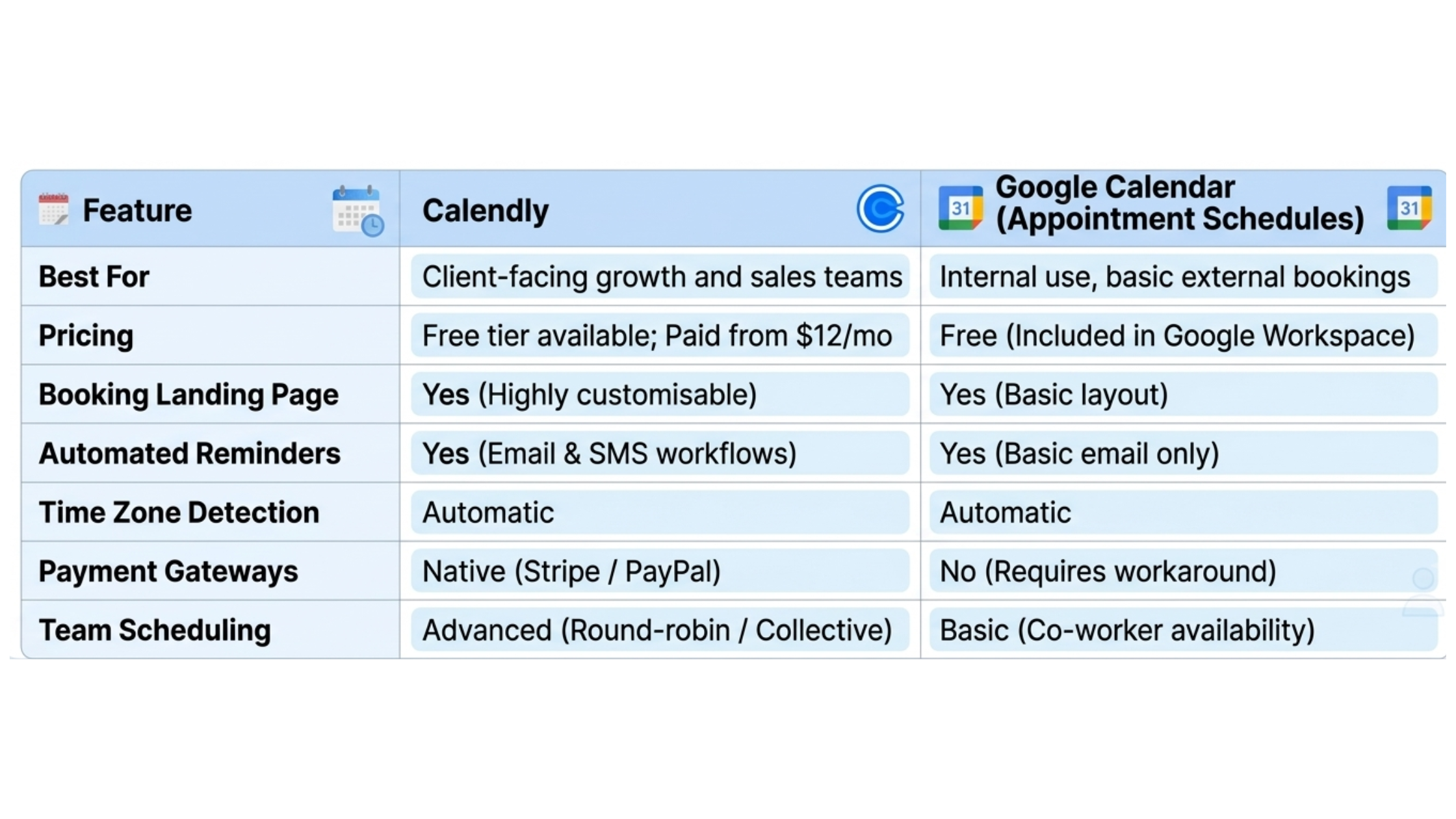
Calendly vs Google Calendar Scheduling Tool: Side-by-Side Comparison
Frequently Asked Questions About Online Appointment Scheduling
Does Google Calendar have a feature like Calendly?
Yes. Google Calendar offers a feature called Appointment Schedules. It allows you to create a shareable booking page where external clients can see your free slots and book a time, similar to Calendly’s core functionality.
Can you use Calendly and Google Calendar together?
Absolutely. This is the most popular setup for Australian SMEs. Calendly connects directly to your Google Calendar, reading your real-time availability to prevent double-bookings and automatically injecting new appointments into your calendar.
Grow Your SME Faster with Premium Appointment Scheduling Deals
The debate over which scheduling tool is far better ultimately boils down to what your SME needs to grow faster.
Google Calendar's built-in tool is fantastic and costs nothing if you just need a clean, simple link to let a client pick a time, while Calendly is well worth the investment if you need a conversion-optimised sales funnel with SMS reminders, CRM tracking, and upfront payments.
And in case you were wondering, EmpireOne lets you access exclusive discounts on multiple appointment scheduling deals through premium memberships.
Sign up for free to discover the most popular deals in our B2B SaaS marketplace!
Related Reading: Claude vs ChatGPT: What’s the Difference?
Related Reading: 5 Project Management Software: 2026 Tech Audit