

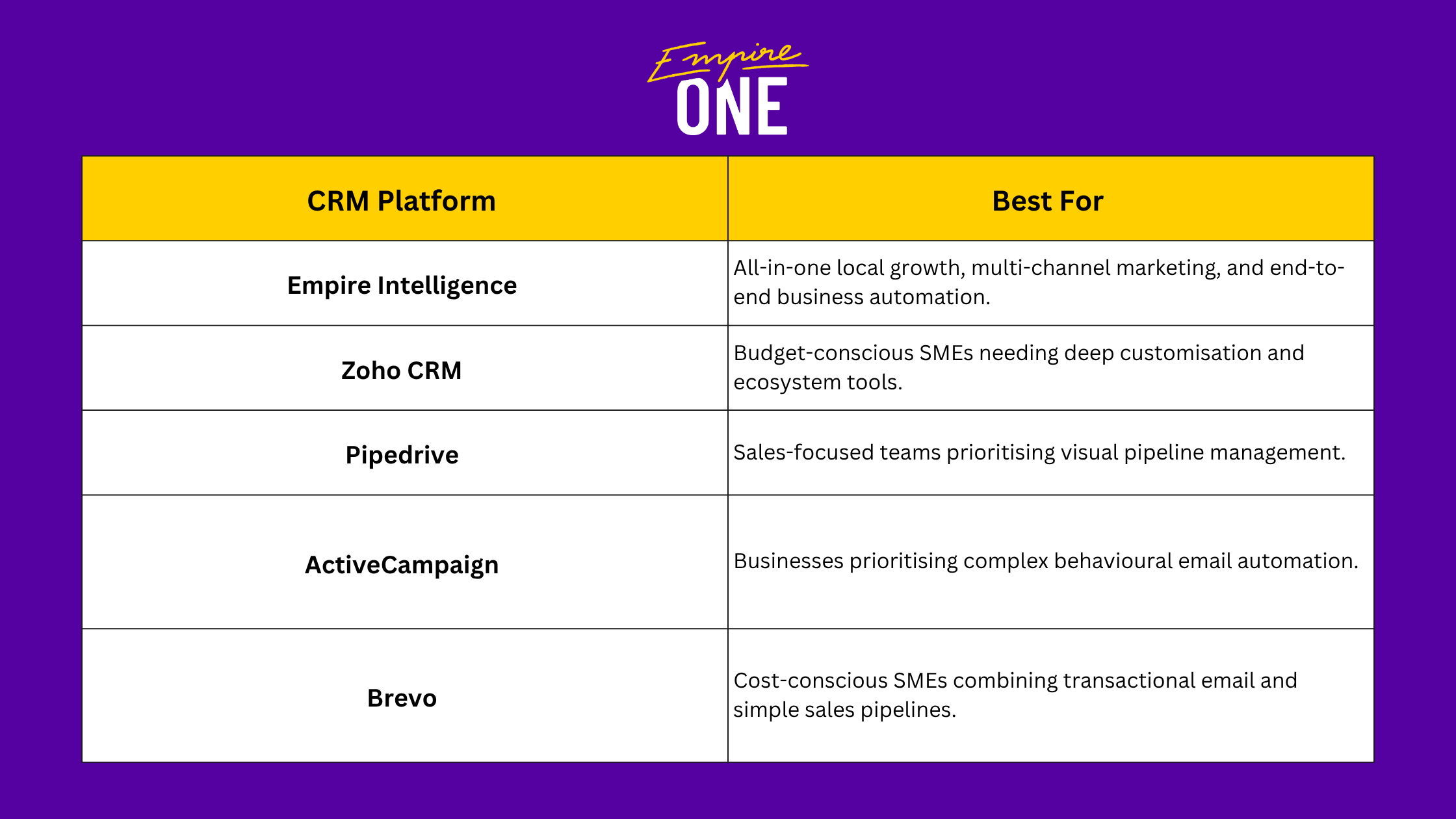
The best HubSpot alternatives for Australian small and medium-sized businesses (SMEs) in 2026 are Empire Intelligence, Zoho, Pipedrive, ActiveCampaign, and Brevo, each simpler, cost-effective, and more transparent.
Now, depending on your data location, budget, and how much functionality you actually need, you can determine which fits your business. Not every SME requires HubSpot's full marketing suite.
Industry analysis shows that HubSpot is two to five times more expensive than other comparable alternatives, leading to companies leaving HubSpot in 2026.
Key Takeaways
- Top 2026 HubSpot alternatives include Empire Intelligence, Zoho, Pipedrive, ActiveCampaign, and Brevo.
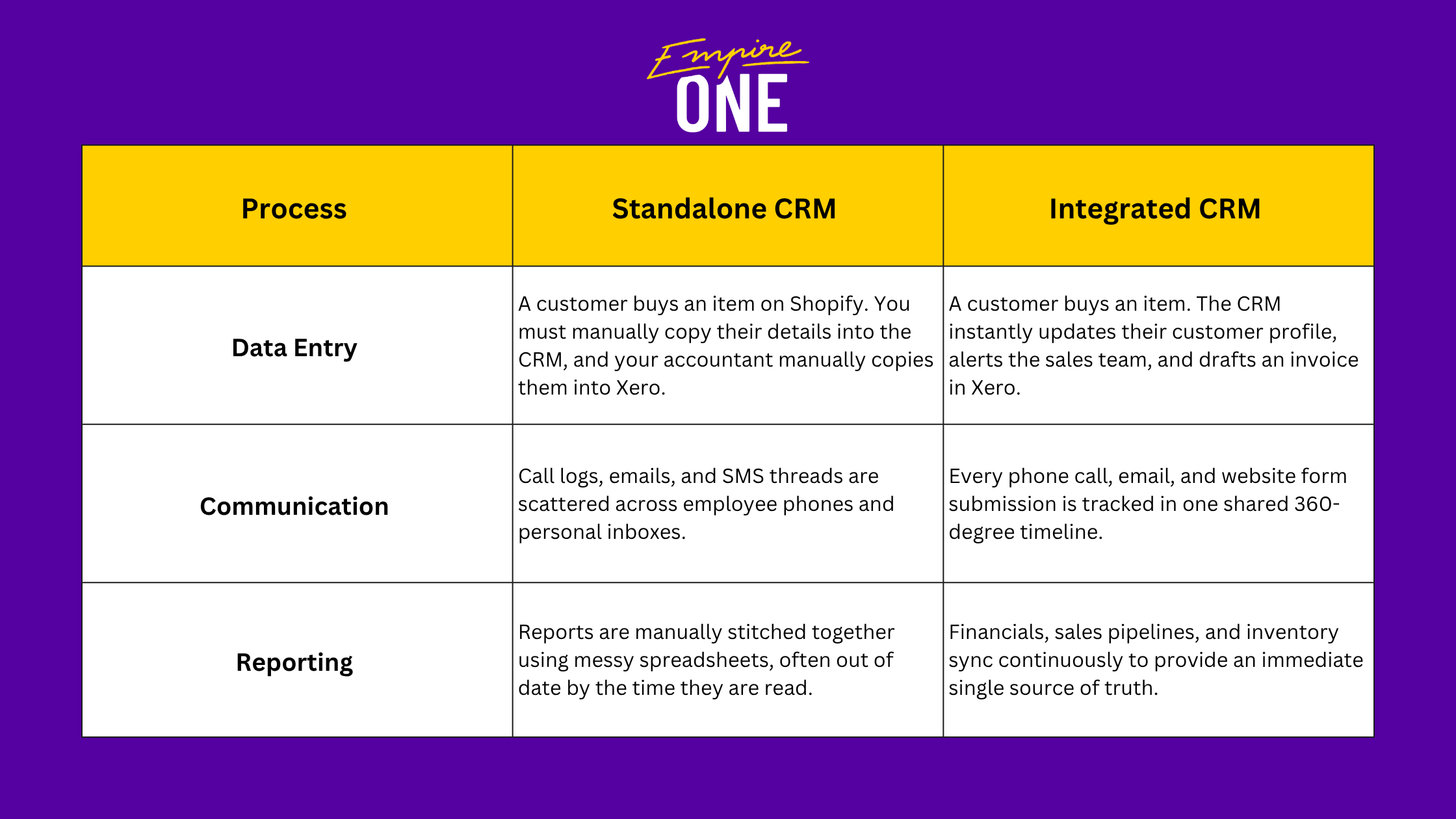
- Integrated CRMs automate workflows, connecting tools like Shopify and Xero for seamless data flow.
- Evaluate CRMs based on local data residency, budget, AUD pricing, and needed marketing functionality.
- Migrating off HubSpot requires a clean audit, field mapping, test imports, and parallel validation.
What Is CRM Integration (And Why Does It Matter for Australian SMEs)?
CRM integration is the process of connecting your Customer Relationship Management (CRM) software with the other essential applications your business uses daily. Instead of operating in isolation, an integrated CRM acts as a central command centre, allowing data to flow seamlessly between systems like your website, email marketing, phone systems, and invoicing software.
When your CRM is integrated, an action in one tool automatically triggers an action or updates data in another.
5 HubSpot CRM Alternatives for Australian SMEs in 2026
1. Empire Intelligence
Empire Intelligence is Australia’s all-in-one CRM and automation platform, helping small businesses manage leads, automate follow-ups, and close more deals without the hassle of scattered tools.
Pros
- Pricing starts at $89/month with cost-effective onboarding and support packages.
- Aggregates SMS, email, Facebook Messenger, Google Business Messages, and web chat into a single consolidated inbox.
- Includes automated review request workflows (such as Google review triggers post-sale), which are valuable for local service businesses.
- Build and launch automated email or SMS drip campaigns to your entire list in minutes.
- Track lead sources, identify high-converting campaigns, and pinpoint your exact revenue drivers.
- Streamline appointment scheduling and use automated reminders to cut no-shows.
- Comes with a free Empire One membership
Cons
- As it’s based on GoHighLevel (GHL), it stores data on cloud providers such as Google Cloud Platform and Amazon Web Services in the United States.
2. Zoho
Zoho CRM offers one of the most comprehensive software suites on the market that helps small businesses in Australia get a full suite (sales, marketing, support) without HubSpot-level pricing.
Pros
- Highly customisable modules, layout builders, and automation rules.
- Australian data centre options for localised data residency compliance.
- Very cost-effective entry point for basic sales tracking.
Cons
- High complexity and steep learning curve.
- Often requires an external consultant to implement.
- User interface can feel fragmented across different modules.
3. Pipedrive
Pipedrive is a cloud-based sales CRM and pipeline management software that helps businesses track leads, visualise sales processes, and automate repetitive tasks.
Pros
- Extremely intuitive drag-and-drop interface with almost zero learning curve.
- Strong mobile app for sales representatives working on the field across Australia.
- Excellent built-in deal tracking and activity reminders.
Cons
- Limited built-in marketing automation (requires third-party integrations).
- Billed primarily in USD, exposing Australian buyers to exchange rate variance.
4. ActiveCampaign
ActiveCampaign combines sales automation with advanced email marketing and customer lifecycle management.
Pros
- Industry-leading visual workflow builder for complex email and event-based triggers.
- Strong site tracking and user behaviour analytics.
- Dedicated Australian office presence providing local market support.
Cons
- Contact-based pricing scales up rapidly as your mailing list grows.
- Core sales CRM features are less robust than dedicated pipeline tools.
5. Brevo
Brevo (formerly known as Sendinblue) is an all-in-one customer relationship and marketing platform designed for email marketing, SMS, WhatsApp campaigns, chat, and CRM management.
Pros
- Unique pricing model based on email volume sent rather than contact count.
- Integrated multi-channel messaging (Email, SMS, WhatsApp).
- Affordable entry-level options for businesses.
Cons
- Pipeline management and sales CRM features are basic.
- Customer support response times can vary depending on subscription level.
How to Migrate Your Data Off HubSpot Before Canceling Your Plan
Migrating your data off HubSpot doesn't have to be painfully taxing as long as you follow a structured and low-risk process. You need to run both systems in parallel briefly, validate everything, then cut over cleanly before closing your HubSpot account.
Follow these steps before you cancel your plan:
Step 1: Audit and Clean Your Database
- Delete hard bounces, unsubscribes, and spam contacts to avoid paying for dirty data in your new CRM.
Step 2: Export All Core Objects (CSV format)
- Go to Contacts, Companies, Deals, and Tickets.
- Export full property records for each object (ensure you include standard IDs to preserve relationships).
Step 3: Export Media and Content Assets
- Download hosted files, document templates, and marketing assets stored within HubSpot’s File Manager.
Step 4: Map Data to Your New CRM
- Align HubSpot custom properties with the fields in your new platform before importing.
Step 5: Run a Test Import
- Import a sample batch of 50 contacts and deals to verify field mapping and relational data.
Step 6: Cancel HubSpot Subscription
- Once migration is verified, navigate to Account & Billing in HubSpot and submit your cancellation request prior to your auto-renewal lock-in date.
Frequently Asked Questions
Which CRM alternatives store data in Australian data centres (Data Residency)?
Zoho offers localised data hosting in Australian data centres (Sydney and Melbourne) to assist businesses with strict Australian Privacy Principles (APPs) and local privacy laws.
How long does a typical CRM migration take for a small team?
For an Australian SME with under 20 users and standard data pipelines, a complete migration typically takes one to two weeks. This includes data cleanup, field mapping, user onboarding, and testing.
Which alternative offers local Australian support hours?
Empire Intelligence includes a comprehensive AI support platform across all plans, with optional, cost-effective 24/7 human escalation covering live chat and Zoom-based support. Meanwhile, platforms like ActiveCampaign and Zoho also maintain regional support teams in Australia.
Which HubSpot CRM Alternative Should You Use?
Start by narrowing down what your business actually needs. Are you trying to solve contact management, email marketing, lead nurturing, customer support, or sales pipelines?
If you're looking for an easy-to-use and highly automated CRM that your team will actually use, Empire Intelligence might be right for you. You can manage leads, you can automate follow-ups, and you can close more deals without the chaos of disconnected tools.
Start your 7-day free trial now! No commitment, cancel anytime.